Documents (Knowledge)
Documents allow Service Owners to provide additional knowledge and context to their AI Processors. Each document is linked to a specific Service, and all AI Processors associated with that service can access it.
This is useful when a general-purpose LLM lacks the specific domain knowledge needed to produce accurate outputs — for example, internal compliance requirements, vendor-specific configuration guides, naming conventions.
How it works
When an AI Processor has Enable pack context turned on (see Pack Pipeline Options), the content of the enabled documents is included in the prompt payload sent to the LLM. This gives the model access to your organization's specific knowledge.
Service Owners can upload multiple documents per service. However, not every document needs to be included in every AI interaction. Documents can be selectively enabled or disabled, since including all documents every time can reduce output quality, exceed the LLM token limit, or increase costs.
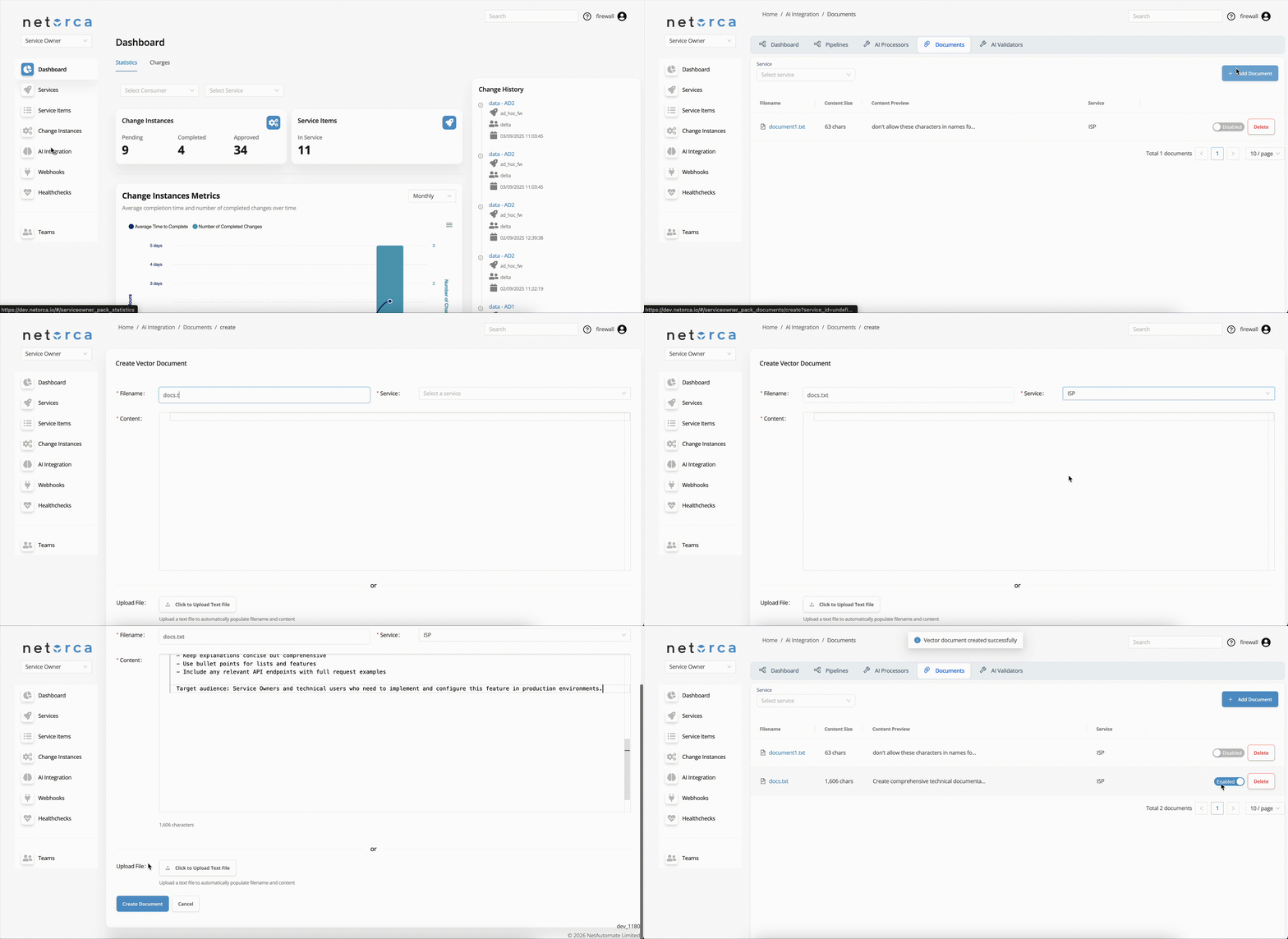
Creating a document
POST /v1/ai/serviceowner/documents/service/<service_id>/ HTTP/1.1
Content-Type: application/json
Authorization: Token <YOUR_TOKEN>
{
  "filename": "firewall_naming_conventions.txt",
  "raw_content": "All firewall rules must follow the naming pattern: <env>-<zone>-<direction>-<port>. Example: prod-dmz-inbound-443."
}
Example use cases
Documents are particularly effective for:
- Compliance and regulatory requirements — Upload internal security policies or regulatory standards so generated configurations automatically comply.
- Vendor-specific guides — Provide vendor documentation (e.g., F5 AS3 schema rules, PaloAlto configuration constraints) to improve configuration accuracy.
- Naming conventions and standards — Define your organization's naming patterns, IP addressing schemes, or tagging standards.
- Device and infrastructure inventories — device lists, or topology information so the LLM can reference real infrastructure data.
- API documentation — Provide API specs for downstream systems that the generated configurations will target.
Example document
Below is an example of a document that could be uploaded to guide AI Processors in generating configurations that follow your organization's standards:
# Firewall Rule Configuration Standards

## Naming Convention
All firewall rules must follow the naming pattern: <env>-<zone>-<direction>-<port>
Example: prod-dmz-inbound-443

## Allowed Environments
- prod, staging, dev

## Zone Definitions
- dmz: publicly accessible services
- internal: backend services only
- management: infrastructure management traffic

## Security Requirements
- All inbound rules must specify a source IP range (no 0.0.0.0/0 allowed in prod)
- SSH (port 22) is only allowed from the management zone
- HTTPS (port 443) must use TLS 1.2 or higher
- All rules must include a description field explaining the business justification

## Default Deny
All configurations must end with an explicit deny-all rule.