Pack Pipeline
The Pack Pipeline is the core processing workflow in NetOrca Pack. It chains three sequential stages — CONFIG, VERIFY, and EXECUTION — to generate, validate, and finalize configurations.
Each stage gathers relevant information — such as the service item declaration, deployed item data, and service configurations — assembles it into a prompt, and sends it to the configured LLM. The LLM's response is stored as PackData.
The VERIFY and EXECUTION stages also receive the PackData from previous stages, so each stage builds on the output of the ones before it:
- CONFIG receives the service item declaration
- VERIFY receives the declaration and the CONFIG PackData
- EXECUTION receives the declaration and both CONFIG and VERIFY PackData
How to Setup
To build a Pack Pipeline, create an AI Processor for each stage you need (CONFIG is required; VERIFY and EXECUTION are optional). Each AI Processor is linked to a service and assigned to a specific stage.
POST /v1/external/serviceowner/ai_processors/ HTTP/1.1
Content-Type: application/json
Authorization: Token <YOUR_TOKEN>
{
  "name": "config for firewall rule",
  "service": <service_id>,
  "llm_model": <llm_model_id>,
  "action_type": "<config|verify|execution>",
  "prompt": "Generate an AWS AS3 and PaloAlto json configuration for the given service item declaration.",
  "active": true,
  "response_schema": {.. response json schema for the AI Processor},
  "extra_data": {
    "include_change_instance": true,
    "enable_pack_context": true,
    "include_previous_declaration": false,
    "include_previous_pipeline_data": ["config"],
    "include_service_config": true,
    "enable_generative_ui": false,
    "generative_ui_schema": null,
  }
}
Options
The following options control what additional data is included in the prompt payload sent to the LLM:
- Include change instance — Includes the latest change instance related to the service item. Useful when processing decisions depend on whether the change is a new deployment, modify, or delete.
- Enable pack context — Includes documents content as extra knowledge in the payload, see Documents.
- Include previous declaration — Adds the previous approved declaration for the service item, enabling differential configuration generation.
- Include service config — Includes the latest Service Config JSON in the payload, giving the LLM access to the service-level settings.
- Include previous pipeline data (
include_previous_pipeline_data) — When retriggering, includes the PackData from stages of the previous pipeline run so the LLM can learn from prior outputs. - Enable generative UI (
enable_generative_ui) — Instructs the AI Processor to return a Generative UI response with rich UI components besides the main plain text or JSON PackData (see Deterministic UI).
Trigger
There are 3 ways to trigger a Pack Pipeline:
- Automatically via Change Instance Approval — When a CONFIG AI Processor is set up for a service, approving any change instance related to that service automatically starts the CONFIG stage. If auto-approval is enabled, the change instance is approved immediately upon consumer submission, triggering the pipeline with no delay.
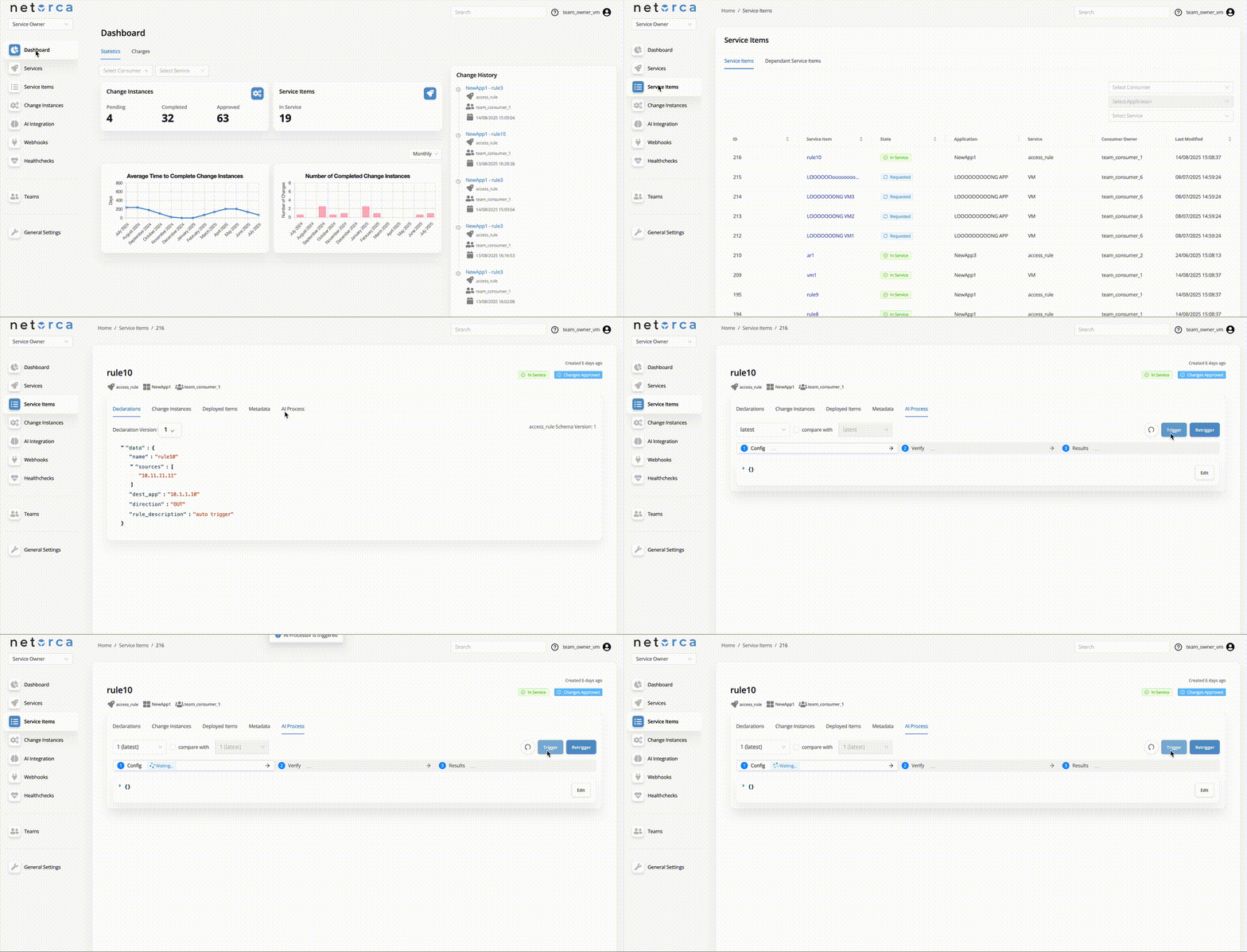
- Trigger an AI Processor via endpoint directly — Service Owners can trigger an active AI Processor directly. This takes the latest approved declaration of the service item and initiates the pipeline. Each stage can be triggered separately, provided the PackData from the previous stage exists.
- Push PackData for each stage manually via API — PackData does not always have to come from an AI Processor. Service Owners can provide PackData from external services, scripts, or testing frameworks and insert it into any stage, effectively replacing or augmenting the AI-driven step.
When each stage finishes successfully, the next stage is triggered automatically if an active AI Processor exists for it.
Trigger via endpoint
Push PackData manually
Each stage of the pipeline can receive PackData from external sources instead of the LLM. For example, CONFIG and VERIFY can be generated by the AI Processor, while an external script runs tests in a simulation environment. If errors are detected, the script can push the error details into the EXECUTION stage, which may then retrigger the workflow for self-healing.
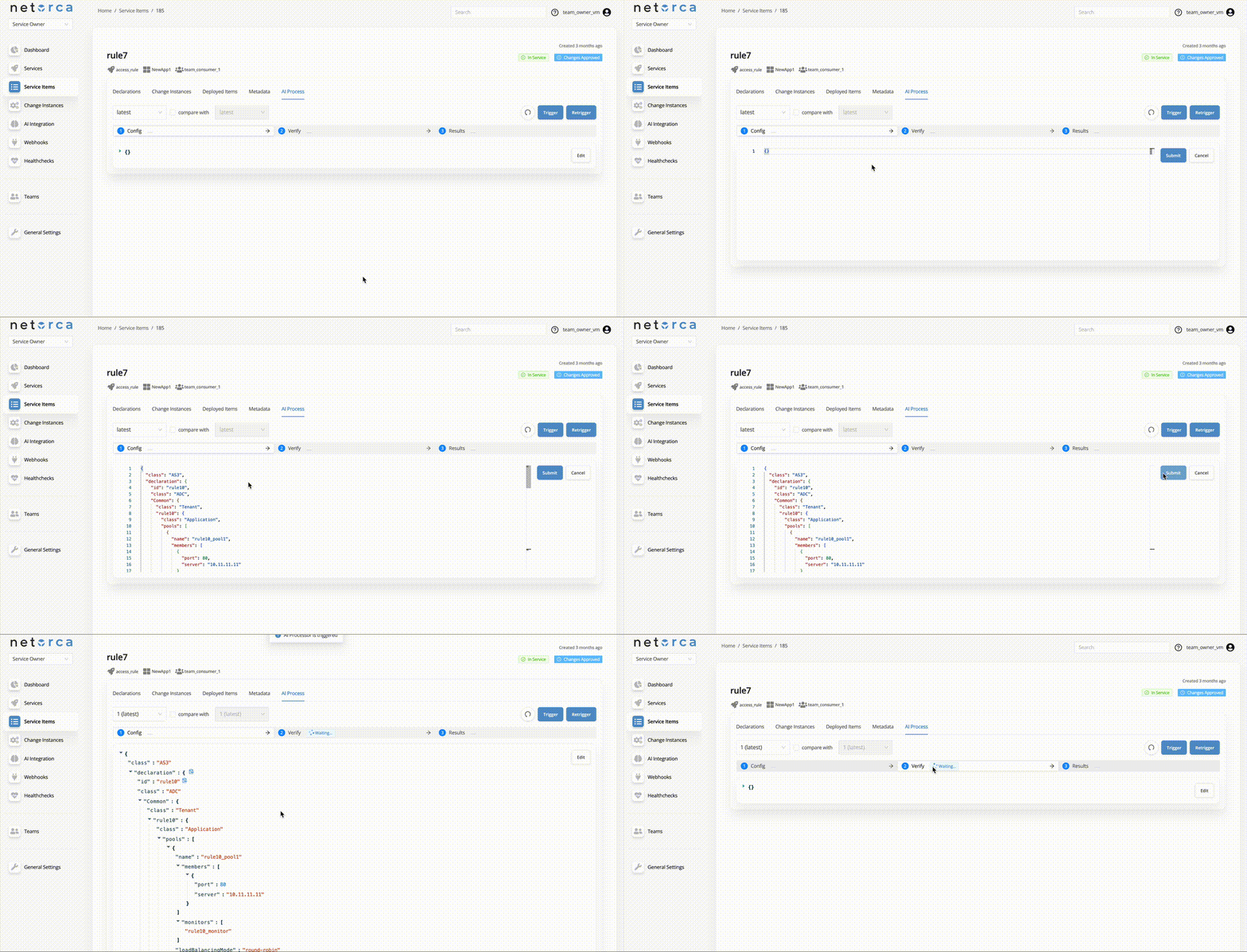
If an AI Processor is available and active for the next stage, it will be triggered automatically.
Retrigger and Healing Loop
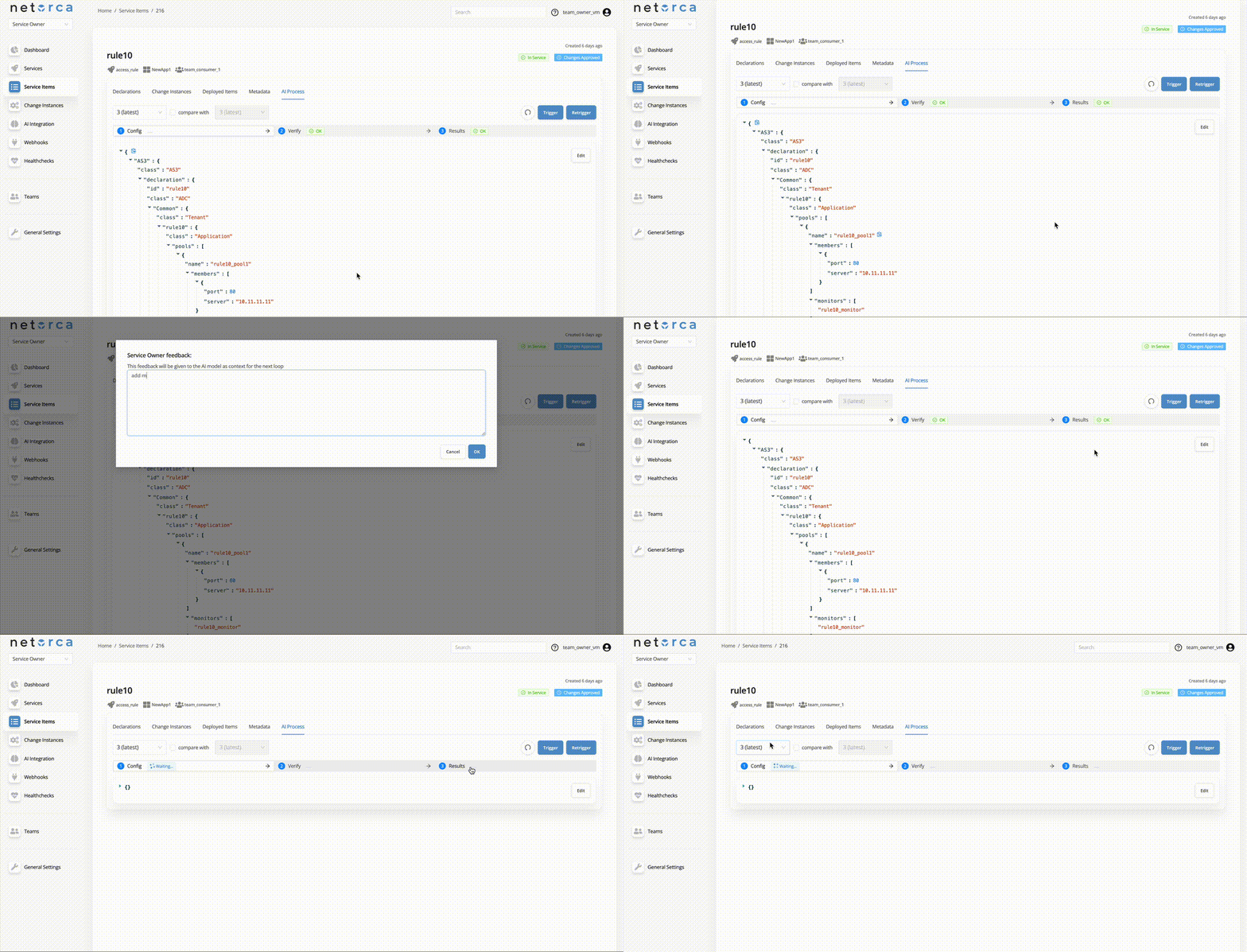
The Retrigger endpoint restarts the entire pipeline from the CONFIG stage while preserving the previous execution context. This is the basis of the self-healing loop — the system reattempts configuration generation, optionally incorporating feedback about what went wrong.
A Service Owner can provide a feedback comment, which becomes part of the execution context to help the AI correct the configuration. When retriggering, previous stage PackData outputs are optionally included (controlled by the Include last pipeline's stages option).
Final Prompt
The final payload sent to the LLM combines multiple sources of context into a single structured prompt. The exact contents depend on the stage, the enabled options, and whether the pipeline is being retriggered.
{
  "netorca_prompt": "<system prompt provided by LLM Model>",
  "serviceowner_prompt": "<AI Processor prompt provided by the Service Owner>",
  "service_item": {"... service item declaration"},
  "change_instance": {"... latest change instance (if include_change_instance is enabled)"},
  "previous_declaration": {"... previous approved declaration (if include_previous_declaration is enabled)"},
  "service_config": {"... latest service config JSON (if include_service_config is enabled)"},
  "serviceowner_comment": "optional comment from Service Owner (only in retrigger mode)",
  "config": {"... PackData generated by CONFIG AI Processor (in VERIFY/EXECUTION stage or retrigger)"},
  "verify": {"... PackData generated by VERIFY AI Processor (in EXECUTION stage or retrigger)"},
  "execution": {"... PackData generated by EXECUTION AI Processor (only in retrigger)"},
  "previous_pipeline": {"... PackData from all stages of the previous pipeline run (if include_previous_pipeline_data is enabled, only in retrigger)"},
  "pack_context": ["... document content from uploaded Documents (if enable_pack_context is enabled)"]
}
PackData
PackData represents the output generated at each stage of the NetOrca Pack pipeline. These objects contain the output produced when an AI Processor is triggered, such as configuration files, validation reports, test outcomes, and other data generated during the processing stage. To fetch PackData, Service Owners can use the following endpoint:
Monitoring Pipelines
Service Owners can monitor the state of their pipelines to track progress, identify failures, and review the PackData generated at each stage.
States of pipeline stages
The state of a pipeline represents its current operational state for that stage. This field shows whether the pipeline has completed, failed, been scheduled for execution, or is waiting for a response. The table below shows all values of state and their meanings:
state |
Description |
|---|---|
OK |
Pipeline stage completed successfully. |
FAILED |
Pipeline stage execution failed. |
SCHEDULED |
Request queued for execution. |
WAITING_FOR_RESPONSE |
Request has been sent and is actively waiting for response. |
Fetching the latest pipeline
Retrieve the most recent pipeline run for a given service item.
Specific pipeline
Retrieve a specific pipeline by its ID, useful for inspecting historical runs or debugging a particular execution.