LLM Models
LLM Models are configuration profiles that connect NetOrca Pack to large language model providers such as OpenAI, Anthropic Claude, Google Gemini, Enterprise LLM Gateways, etc. They supply the intelligence behind NetOrca's AI features. Organizations can also connect to private LLMs through internal gateways or enterprise AI platforms to maintain data privacy and comply with organizational policies.
Setting Up LLM Models
Each LLM Model in NetOrca represents a configured connection to a Large Language Model with specific parameters. Different LLM providers require different configuration parameters, authentication methods, and connection settings. The following providers are currently supported. See the examples below for the required configuration per provider:
Provider Examples:
POST /v1/ai/llm_models/ HTTP/1.1
Content-Type: application/json
Authorization: Token <YOUR_TOKEN>
{
    "name": "MyAgent",
    "provider": "openai",
    "model_name": "gpt-4o",
    "prompt": "You are a devops engineer assistant. Follow the service owner's instructions.",
    "timeout": 60,
    "input_price_per_1m_tokens": 2.50,
    "output_price_per_1m_tokens": 10.00,
    "extra_data": {
        "api_key": "sk-...",
        "base_url": "https://api.openai.com/v1"
    }
}
POST /v1/ai/llm_models/ HTTP/1.1
Content-Type: application/json
Authorization: Token <YOUR_TOKEN>
{
    "name": "MyAgent",
    "provider": "openai_assistant",
    "model_name": "gpt-4o",
    "prompt": "You are a devops engineer assistant. Follow the service owner's instructions.",
    "timeout": 120,
    "input_price_per_1m_tokens": 2.50,
    "output_price_per_1m_tokens": 10.00,
    "extra_data": {
        "OPENAI_API_KEY": "sk-...",
        "OPENAI_ASSISTANT_ID": "asst_..."
    }
}
POST /v1/ai/llm_models/ HTTP/1.1
Content-Type: application/json
Authorization: Token <YOUR_TOKEN>
{
    "name": "MyAgent",
    "provider": "anthropic",
    "model_name": "claude-opus-4-5-20251101",
    "prompt": "You are a devops engineer assistant. Follow the service owner's instructions.",
    "timeout": 60,
    "input_price_per_1m_tokens": 3.00,
    "output_price_per_1m_tokens": 15.00,
    "extra_data": {
        "api_key": "sk-ant-...",
        "base_url": "https://api.anthropic.com"
    }
}
POST /v1/ai/llm_models/ HTTP/1.1
Content-Type: application/json
Authorization: Token <YOUR_TOKEN>
{
    "name": "MyAgent",
    "provider": "gemini",
    "model_name": "gemini-3-pro-preview",
    "prompt": "You are a devops engineer assistant. Follow the service owner's instructions.",
    "timeout": 60,
    "input_price_per_1m_tokens": 1.25,
    "output_price_per_1m_tokens": 5.00,
    "extra_data": {
        "api_key": "AIza...",
        "base_url": "https://generativelanguage.googleapis.com/v1beta"
    }
}
POST /v1/ai/llm_models/ HTTP/1.1
Content-Type: application/json
Authorization: Token <YOUR_TOKEN>
{
    "name": "MyAwesome-GenAI",
    "provider": "genai",
    "model_name": "gpt3o-mini",
    "prompt": "You are a devops engineer assistant. Follow the service owner's instructions.",
    "timeout": 30,
    "extra_data": {
        "token_url": "https://auth.example.com/token",
        "request_url": "https://gateway.example.com/generate",
        "credentials": "Bearer AwesomeKey",
        "verify_ssl": false,
        "request_payload": {}
    }
}
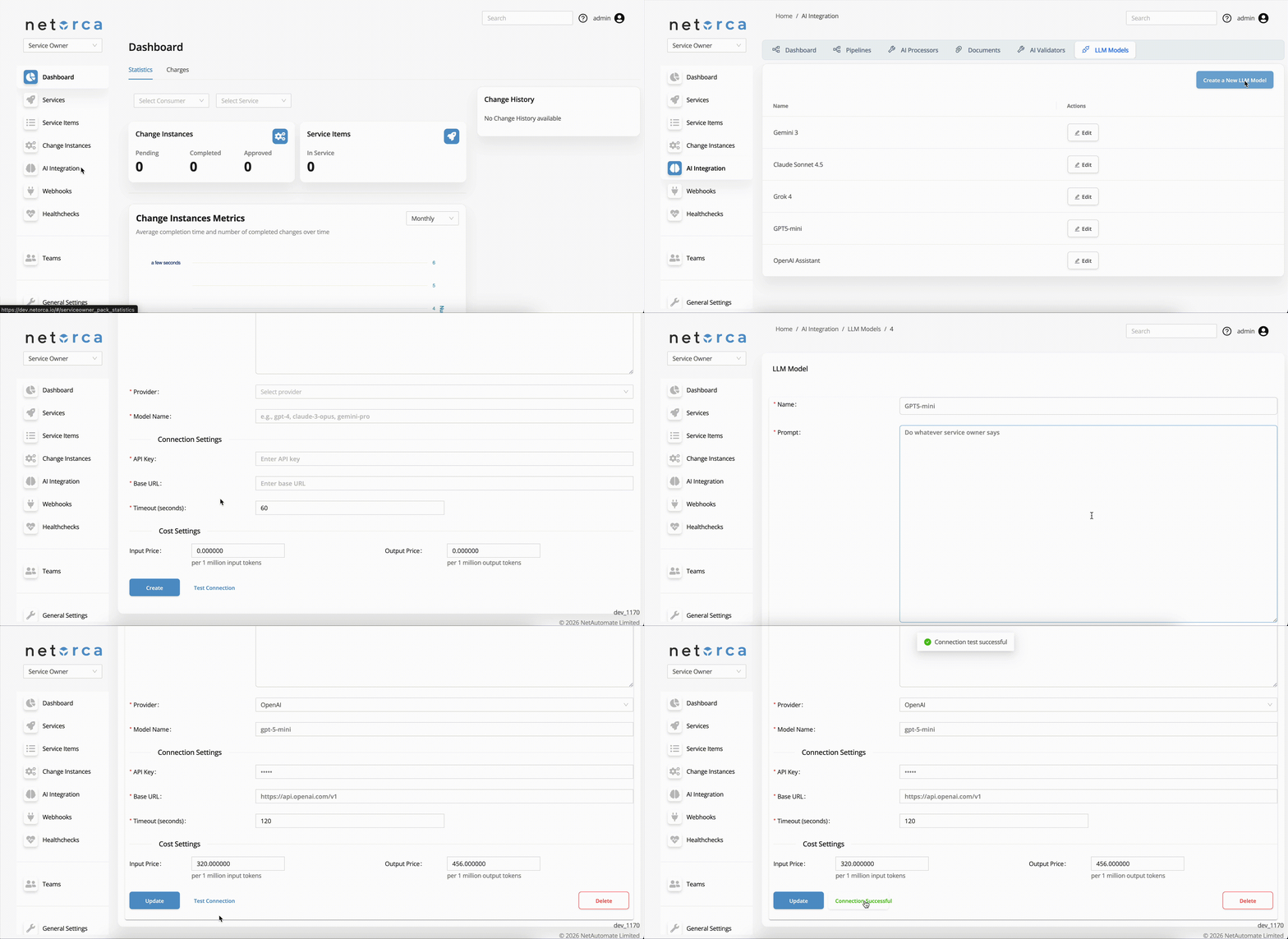
Prompt (System Prompt)
The system prompt defines the AI model's role, expertise, and behavioral guidelines. It provides the foundational context that shapes how the model interprets and responds to all requests.
Recommendation for writing effective prompts: Clearly define the role the AI should act as, specify the technical domain and knowledge areas, and set boundaries or quality requirements to ensure reliable responses. An Example:
You are an AWS DevOps engineer who knows all AWS configurations and endpoints.
You will be given a service owner prompt that acts as your further instructions.
Your inputs are consumer declarations, and based on them, you must generate accurate,
ready-to-deploy AWS configuration files.
Costs
NetOrca can track and calculate the cost of AI operations through Cost Settings in LLM Models, helping you monitor spending and optimize usage. These costs, along with other LLM-related metrics and analytics, are available in the AI Integration Dashboard.
Note that token counts are reported by each LLM provider, so the counting methodology may vary between providers.
How Cost Calculation Works
All major LLM providers return the number of input and output tokens consumed with each API response. This has become a standard practice. NetOrca uses these token counts to calculate costs by multiplying them against the rates you define per model.
You can configure the following pricing fields for each LLM Model based on your provider's rates:
- Input Price per 1M Tokens — Cost for tokens sent to the model (prompts, context)
- Output Price per 1M Tokens — Cost for tokens generated by the model in responses
For example, if a request consumes 2,000 input tokens and 500 output tokens, and the configured rates are $2.50 / $10.00 per 1M tokens respectively, the cost would be:
(2,000 / 1,000,000 × $2.50) + (500 / 1,000,000 × $10.00) = $0.01
Example pricing (USD):
- GPT-4o: $1.50 input / $3.00 output per 1M tokens
- Claude 3.5 Sonnet: $2.00 input / $4.00 output per 1M tokens
Test Connection
While configuring an LLM Model and before assigning it to an AI Processor, you can test the connection to verify that the credentials, endpoint, and model settings are correct before it is used in production workflows.
The test works by sending a short basic message to the LLM and expecting an actual generated response back — not just an HTTP status code. This ensures that the model is reachable.
POST /v1/ai/llm_models/test_connection/<llm_model_id>/ HTTP/1.1
Content-Type: application/json
Authorization: Token <YOUR_TOKEN>
{
    "name": "MyAwesome-Gemini",
    "provider": "gemini",
    "model_name": "gemini-1.5-pro",
    "prompt": "You are a devops engineer assistant. Follow the service owner's instructions.",
    "timeout": 60,
    "input_price_per_1m_tokens": 1.25,
    "output_price_per_1m_tokens": 5.00,
    "extra_data": {
        "api_key": "AIza...",
        "base_url": null
    }
}